Saturday, June 17, 2017

Get Blu-ray to MKV with multiple subtitles and audio tracks keeping


Nowadays, a commercial Blu-ray disc always has different built-in subtitle tracks for custom form different countries.If you want to output with multiple audio and subtitle for better learning foreign language, you can choose MKV for the format of conversion, because MKV format is able to hold unlimited and any type of audio, video and subtitle streams. You can put a complete movie into a single file including various audio, video and subtitle streams as well preserving menus and chapter structure. You can find everything in a MKV file when coping and converting Blu-ray movie to MKV.


You can use ultimate to rip Blu-ray to MKV with multiple subtitles and audio tracks. As to playing MKV on PC after finishing Blu-ray backup, you can install MKV-compatible media players such as Dimo Video Converter Ultimate which can fully support MKV playback. Players like Media Player Classic and MplayerX are also great choices. External HDD media players like WDTV, Porpcorn Hour, and Seagate Free Agent can also realize MKV playback. If you are Mac user, please turn to Dimo Video Converter Ultimate for Mac 

Free Download Dimo Video Converter Ultimate (Win/Mac):

          

Other Download: 

How to backup Blu-ray to MKV with mutiple audio/subtitle tracks

Step 1: Load Blu-ray movies

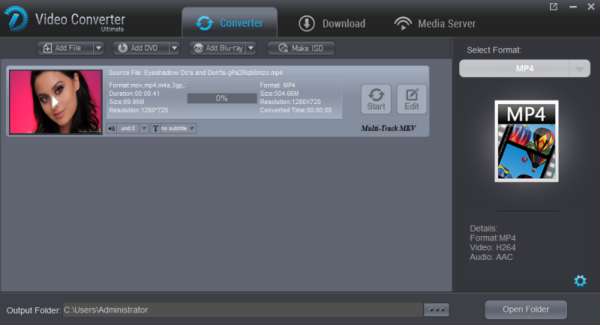
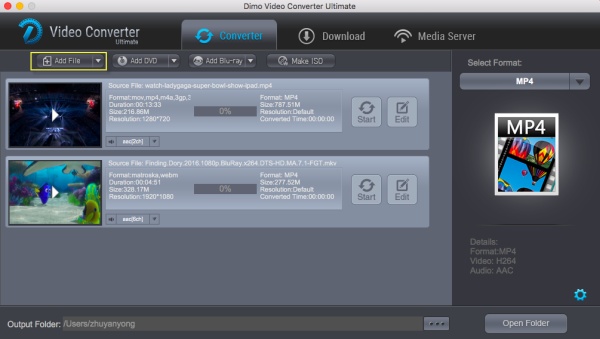
Insert the Blu-ray disc to the  drive and then click "Add Blu-ray" button to have Blu-ray movies uploaded to surface. You can also import DVD files for conversion.


Note: When importing a Blu-ray disc, please make sure that your PC has been equipped with an external or internal Blu-ray drive to recognize your Blu-ray disc.

Step 2: Choose multi-track output 

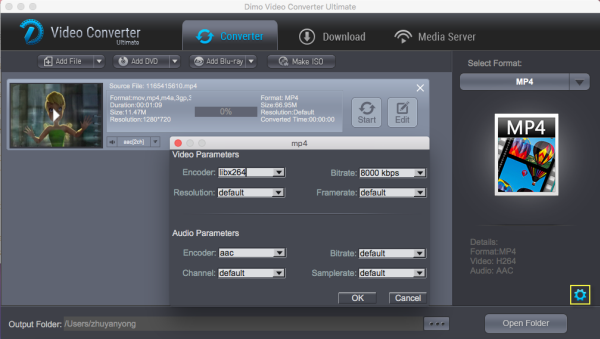
Click the "Audio" tab to check the audio channels you want and uncheck the unwanted. Click the "Subtitle" tab to check the subtitle language you want to keep and uncheck the unwanted ones. In addtion, click the "Multi-track MKV" where you can change video/audio/subtitle settings. And choose format "Common>video>MKV"to get the output video with multiple audio tracks and subtitles.


Step 3: Start converting Blu-ray to lossless MKV

Go back to the main surface and click "Start" to start conversion from Blu-ray to MKV with multiple audio tracks and subtitles preserved.

Tip: You can rip DVD with Multi Track and make Blu-ray copy without anything loss. Besides, you can convert videos to MP4, FIL, AVI, VOB,  WMV, iPad, iPhone, HTC, Samsung, etc.

Free Download or Purchase Dimo Video Converter Ultimate:


Need the lifetime version to work on 2-4 PCs so that your friends and family can instantly broaden their entertainment options? Please refer to the family license here


Kindly Note:

The price of Dimo Video Converter Ultimate for Windows is divided into 1 Year Subscription, Lifetime/Family/Business License: $43.95/Year; $45.95/lifetime license; $95.95/family license(2-4 PCs); $189.95/business pack(5-8 PCs). Get your needed one at purchase page.
Related Software:

BDmate (Win/Mac)

Lossless backup Blu-ray to MKV with all audio and subtitle tracks; Rip Blu-ray to multi-track MP4; ConvertBlu-ray to almost all popular video/audio formats and devices; Copy Blu-ray to ISO/M2TS; Share digitized Blu-ray wirelessly.

DVDmate (Win/Mac)

A professional DVD ripping and editing tool with strong ability to remove DVD protection, transcode DVD to any video and audio format, and edit DVD to create personal movie.

Videomate (Win/Mac)

An all-around video converter software program that enables you to convert various video and audio files to formats that are supported by most multimedia devices.

8K Player (Win/Mac)

A mixture of free HD/4K video player, music player, Blu-ray/DVD player, video recorder and gif maker. 

Contact us or leave a message at Facebook if you have any issues.

Related Articles:

Tuesday, June 13, 2017

LG G6 Video Converter-Supported format for LG G6

Why we need convert videos to LG G6

LG G6 is the generation flagship of LG Incorporation. After it releases, the public was impressed immediately by its overwhelmingly stunning appearance design and rovide you an opportunity to experience an optical feast. If you are the users of LG G6,you should notice that the video formats LG G6 supports are limited. Therefore, the next texts will let you know how to convert videos to LG G6.


The format that can be supported by LG G6

Video: MP4/DviX/XviD/H.265
Audio: AAC, AAC+, eAAC+, M4A, AMR, MP3, MIDI, WAV, WMA, PCM, ADPCM, AC3/EC3,   FLAC, Ogg

How to convert video to LG G6?

Obviously, LG G6 supports limited video formats. For playing all movies such as Blu-ray, MKV, MOV, MPG, RMVB movies on LG G6, you have to convert these files to LG G6 supported formats via . Here you need video converter for LG G6. Dimo Video Converter Ultimate is a handy video converter that convert any movies/videos to LG G6 playable format. With this smart video tool, you can rip Blu-ray, avi, mkv, wmv, flv, rmvb, mpg, mov, mp4, m2ts, vob and etc. videos to LG G6 playable format. If you are running Mac system, please turn to you to Dimo Video Converter Ultimate for Mac.

Free Download Dimo Video Converter Ultimate (Win/Mac):


Other Download: 

Step-by-step Tutorial to Convert Videos to LG G6

Step 1. Add Video(s) 
You can free download the latest version of Video Converter Ultimate and install it then launch the software. You can click "Add File" to open file browser to select videos you want to convert.


Step 2. Select Output File Format

After all files added, you can click the "Format" bar to open the drop-down list then choose LG G6 compatible video formats (MP4, WMV, 3GP, 3G2, AVI, MKV, ASF, Web, DivX, and TS Formats) as the output format. It is highly recommended that you choose MP4 as the output format, because MP4 is universally supported and it contains better video quality. You can also choose output formats according to your devices, such as LG G6 , iPad, iPhone, Samsung, Android phone etc.


Tips: You can edit output video now by clicking the "Edit" button at the end of the video, which can cut, trim, or add watermark.

Step 4. Convert Video(s) to LG G6

After all settings done, you can now start the conversion by clicking the button "Start". The automatic conversion will finish on its own in just a few minutes.

Free Download or Purchase Dimo Video Converter Ultimate:


Need the lifetime version to work on 2-4 PCs so that your friends and family can instantly broaden their entertainment options? Please refer to the family license here


Kindly Note:

The price of Dimo Video Converter Ultimate for Windows is divided into 1 Year Subscription, Lifetime/Family/Business License: $43.95/Year; $45.95/lifetime license; $95.95/family license(2-4 PCs); $189.95/business pack(5-8 PCs). Get your needed one at purchase page.

Related Software:

BDmate (Win/Mac)

Lossless backup Blu-ray to MKV with all audio and subtitle tracks; Rip Blu-ray to multi-track MP4; ConvertBlu-ray to almost all popular video/audio formats and devices; Copy Blu-ray to ISO/M2TS; Share digitized Blu-ray wirelessly.

DVDmate (Win/Mac)

A professional DVD ripping and editing tool with strong ability to remove DVD protection, transcode DVD to any video and audio format, and edit DVD to create personal movie.

Videomate (Win/Mac)

An all-around video converter software program that enables you to convert various video and audio files to formats that are supported by most multimedia devices.

8K Player (Win/Mac)

A mixture of free HD/4K video player, music player, Blu-ray/DVD player, video recorder and gif maker. 

Contact us or leave a message at Facebook if you have any issues.

Related Articles:
  • UEFA Euro Games Video Download for Offline Enjoyment
  • 2017 Cannes Film Festival Video Download Tutorial
  • List of Top Gal Gadot Movies and TV Shows
  • Best 7 Blu-ray Players Reviews (Software & Hardware)
  • How to Make a GIF Animation from a Video
  • [2017] 5 Best H.265/HEVC Video Converters for PC/Mac
  • How to Upload WMV to YouTube Effortlessly
  • Best MacOS Sierra Handbrake Alternative
  • Top 3 AnyDVD Alternatives for Blu-ray ripping on Windows 10
  • Best MPEG Streamclip alternative for macos Sierra to rewrap video
  • [/list]

    Friday, June 9, 2017

    How to Free Download NBA Final Videos


    If you are fins of NBA, you can't miss any matches. But you may be lost by something and want to watch it again. You will download the match. So how to download NBA Final for watching and editing? You will know the answer by next section.


    The Time of NBA Final

     Game 1: Thursday, June 1 at Golden State, 9 p.m. ET
     Game 2: Sunday, June 4 at Golden State, 8 p.m. ET
     Game 3: Wednesday, June 7 at Cleveland, 9 p.m. ET
     Game 4: Friday, June 9 at Cleveland, 9 p.m. ET
     Game 5: Monday, June 12 at Golden State, 9 p.m. ET
     Game 6: Thursday, June 15 at Cleveland, 9 p.m. ET
     Game 7: Sunday, June 18 at Golden State, 8 p.m. ET

    The Way of NBA Final

     TV: ABC will broadcast the NBA Finals, which you can access with a cable or satellite subscription or for  free with an over-the-air digital antenna. We have a few, cheap suggestions for the best indoor  antennas.

     Online: WatchESPN.com and the WatchESPN app will have live streams of the games. To stream the game on    WatchESPN, you will need to log in with a cable or satellite TV account.

    Here 8K Player and Dimo Video Converter Ultimate will help you. 8K Player can open any common format and you can use it to output GIF to save the wonderful moments that you want to watch.This software has Windows version and Mac version(8K Player for Mac). If you want to download and convert directly, you can use Dimo Video Converter Ultimate and Dimo Video Converter Ultimate for Mac. It can download video form the internet and convert video to GIF, MP4, FLV, MOV, etc.

    Free Download Dimo Video Converter Ultimate (Win/Mac):


    Other Download: 
    Step 1. Add URL

    You can free download Dimo Video Converter Ultimate and install it. After the installation the software will launch automatically. On the interface you can copy the link to "Add URL" to download file. After it,you can click "Convert" to began.


    Step 2. Choose GIF as Output Video Format

    Making sure all files added, you can now click on the " Format" bar and select GIF as the output format on the drop-down list .If you want to alter the output video's parameter in accordance with your interest, you can click "Edit" at the end of the video to crop or trim the video, and you can even add filter to make the video more special.


    Step 3. Start Converting to GIF

    After all settings done, you can now click the "Start" button to start the conversion. The conversion will finish automatically in minutes. Therefore, you can choose to take a rest.


    Tip: Dimo Video Converter Ultimate serves as an audio converter as well, you can also choose to convert WMA to MP3 with Video Converter Ultimate. In addition, you can rip Blu-ray/DVD disc to other format, such as, MP4, FLV, MOV,MKV etc. and you can convert rip Blu-ray/DVD disc to iPad, iPhone, HTC, Samsung and so on.

    Free Download or Purchase Dimo Video Converter Ultimate:


    Need the lifetime version to work on 2-4 PCs so that your friends and family can instantly broaden their entertainment options? Please refer to the family license here


    Kindly Note:

    The price of Dimo Video Converter Ultimate for Windows is divided into 1 Year Subscription, Lifetime/Family/Business License: $43.95/Year; $45.95/lifetime license; $95.95/family license(2-4 PCs); $189.95/business pack(5-8 PCs). Get your needed one at purchase page.

    Related Software:

    BDmate (Win/Mac)

    Lossless backup Blu-ray to MKV with all audio and subtitle tracks; Rip Blu-ray to multi-track MP4; ConvertBlu-ray to almost all popular video/audio formats and devices; Copy Blu-ray to ISO/M2TS; Share digitized Blu-ray wirelessly.

    DVDmate (Win/Mac)

    A professional DVD ripping and editing tool with strong ability to remove DVD protection, transcode DVD to any video and audio format, and edit DVD to create personal movie.

    Videomate (Win/Mac)

    An all-around video converter software program that enables you to convert various video and audio files to formats that are supported by most multimedia devices.

    8K Player (Win/Mac)

    A mixture of free HD/4K video player, music player, Blu-ray/DVD player, video recorder and gif maker. 

    Contact us or leave a message at Facebook if you have any issues.

    Related Articles:

    Thursday, May 4, 2017

    Problems with Kodi when playing H.265/HEVC videos

    Kodi has become one of the most popular ways to watch TV and movies. With the growth of smaller PCs, on-demand streaming and downloadable content, it has never been simpler to bring your favourite flicks into your living room, and Kodi is possibly the best way to do it. Got some new files in H.265 codec and wanna add them on your Kodi (originally known as XBMC - or 'Xbox Media Center')?  However, it seems a bit complicated as Kodi won't open 4K H.265 as expected.


    Q1: H.265 video play terrible on kodi on ts451A

    I have some H.265 video, I played them on kodi 16 & 17,but the frame droped terrible and video and voice didn't sync. I checked the cpu ocupy is 100%. I want to know if the ts451's cpu not strong enough or the kodi is not work proper for H.265. It's seem's that the hardware accelerate didn't work.

    Q2: Android Box with h.265 hardware encoding issue

    I have an android box right now that I purchased back in 2015 which works ok for my h.264 videos off of my nas. Putting together my archive has been great but my drive is starting to fill up so I have started converting the videos over to h.265 for Kodi and the results are good. I figure I will have at minimum 40% more space once they are converted.

    Unfortunately my older Android Box doesn't decode the h.265 videos very well or good at all. I have been looking at newer generic boxes that support h.265 decoding some of them also have more memory and storage which should be good. However picking the correct CPU/GPU setup is difficult. I hope someone can give me some real world suggestions. Thanks a lot.

    Q3: Looking for a streaming bo supports H265

    As the title suggests I'm looking for a replacement for my trusted WDTV. Been using it for years now. Very reliable. But with the H.265 and new stuff coming out need to upgrade.

    I'm looking for a simple box that supports h265 and h264 and other video codecs as well as audio codecs like Dolby AAX and dts. Just wanna play my tv shows and movies that I download. Streaming from Kodi would be a big plus. 

    Q4: Kodi stutters (badly) when playing HEVC content  

    Kodi stutters unbearably when playing any HEVC content. All drivers on my system are up to date, and Kodi is set to run with the Nvidia GPU (optimus system). I can also confirm that hardware-acelerated decode is both enabled (in Kodi) and is working with HEVC (using DXVA Checker's trace mode). Is there any other way to see what the problem might be? The stutter is so bad, Kodi hangs up momentarily and then resumes playback choppily up to a point, then resumes again.

    Isn't it possible to play 4K H.265 on Kodi? Yes, Kodi (version 14 onwards) offers decoding support for HEVC. (Refer to Kodi HEVC support here) However, lag, out of sync and drop frames issues still exist when playing. Worse still, if your streaming box or devices support HEVC hardware decoding, or have too low power SoCs to support smooth software playback, you will still fail to copy H.265 videos to Kodi for watching.

    See the below limitations:

    1. The Intel Celeron N3060 (Braswell) has limited GPU decoding support of x256 


    2. Only 8bit and not 10bit are supported


    3. Streaming Boxes and Console Support

    Here's a quick rundown of popular media playing devices that don't support HEVC:
    • Google's Chromecast (first and second generations)  
    • Apple TV (although some reports suggest 1080p HEVC playback is possible by running VLC on a 4th-gen model)  
    • Roku (third-gen models and earlier)  
    • Amazon Fire TV (2014) and Fire TV Stick  
    • Any Western Digital WD TV products  
    • All PlayStation consoles (including PS4 Pro)  
    • Xbox 360 
    And here are the media players that do support HEVC:
    • Roku 4  
    • Amazon Fire TV (2015) and 2nd-gen Fire TV Stick  
    • Xbox One
    In this situations, to add and view H.265 files on Kodi, the easy workaround is convert H.265 to a more common video format like MP4, MKV, AVI, MPG, etc.. Actually, it is not so hard as you image. What you need is just a common video converter like Dimo Video Converter Ultimate is a great H.265 tool to help you out. It features a simple yet sleek interface and performs files conversion with fast speed enables you to complete the H.265 to Kodi supported H.264 codec task with least quality loss in just a few clicks at your fingertips. 

    Apart from that, its built-in editor can help users to do some basic editing work before conversion, like trimming, cutting, adding effect/watermark etc. What's more, it also offers the optimal profiles for iPhone, iPad, iPod, Apple TV, TV, PS4 Pro, Xbox One S and more. For Mac users, please get Dimo Video Converter Ultimate for Mac to have a try. Download it from below and read further to know how to successfully convert your H.265 video files into Kodi supported H.264 within clicks. 

    Free Download Dimo Video Converter Ultimate (Win/Mac):


    Other Download: 
    How to convert H.265 video to Kodi format

    1. > Install and run the best H.265 converter for Kodi and transfer your ripped, downloaded H.265 movies or video recordings like from Samsung NX1/NX500, DJI Inspire 2 to the program.


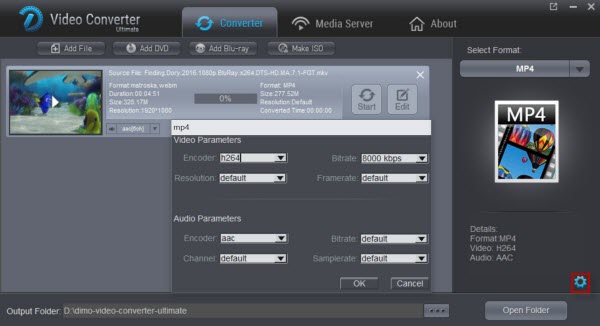
    2. > Click "Select Format" bar and choose H.264 MP4 or MKV from "Format > Video" or "Format > HD Video" as the output format.

    What are the file formats supported by Kodi 

    Container formats: AVI, MPEG, WMV, ASF, FLV, MKV/MKA (Matroska), QuickTime, MP4, M4A, AAC, Ogg, OGM, RealMedia RAM/RM/RV/RA/RMVB, 3gp 

    Video formats: MPEG-1, MPEG-2, H.263, MPEG-4 SP and ASP, MPEG-4 AVC (H.264), H.265 (as from Kodi 14) HuffYUV, MJPEG, RealVideo, RMVB, WMV 

    Audio formats: MIDI, AIFF, WAV/WAVE, AIFF, MP2, MP3, AAC, DTS, ALAC, AMR, FLAC, RealAudio, WMA 

    3D video formats: Passive 3D video formats such as SBS, TAB, anaglyph or interlaced

    Tip: Click the Settings icon to adjust video and audio parameters, like audio & video bitrate, video size, channel as you need.


    3. Click the "Start" icon after all settings, and the H.265 Video Converter will start transcoding H.265 to Kodi preferred format immediately. After the conversion, get the output files by clicking the Open button. After that, you can copy, stream or transfer the converted Blu-ray videos to XBMC for smooth playback at ease without any problem.

    If your files are MKV, VOB, H.265, FLV, XAVC, MOV, WMV, Tivo recording files, camera files like MXF, MTS, or Blu-ray, DVD disc format, Dimo Video Converter Ultimate can also be the best partner with your Kodi. It can help you convert DVDBlu-ray and SD/HD/4K videos to Kodi friendly video with the best quality to expand your movie enjoyment. What’s more, this all-in-one video converter allows you to tweak the video size, bitrate, frame rate, audio codec, etc to get a decent video as you want. 

    Free Download or Purchase Dimo Video Converter Ultimate:


    Need the lifetime version to work on 2-4 PCs so that your friends and family can instantly broaden their entertainment options? Please refer to the family license here


    Kindly Note:

    The price of Dimo Video Converter Ultimate for Windows is divided into 1 Year Subscription, Lifetime/Family/Business License: $43.95/Year; $45.95/lifetime license; $95.95/family license(2-4 PCs); $189.95/business pack(5-8 PCs). Get your needed one at purchase page.

    Contact us or leave a message at Facebook if you have any issues.

    Related Articles:

    Tuesday, May 2, 2017

    Backup Blu-ray to Cloud Storage for Storage

    Online storage is an integral part of life now, and ripping Blu-rays to Cloud Storage not only backs up all your precious movies and videos online, but also makes your Blu-ray library available and accessible through the network disk, Dropbox, Seagate personal cloud media storage, Plex cloud, iCloud, etc. It has many advantages; for example, it frees you from the troubles of disc loss or damage, and the space of physical hard disk, and lets you upload a personal Blu-ray to the cloud (youtube, dropbox, SugarSync) so you can share it with your family members or access your movies at home or on the road.


    As you try to upload Blu-ray to cloud storage device, the fact is that you usually get an error since almost all the Blu-rays are protected with encryption (CSS, Region Code etc.), refusing to copy Blu-ray to cloud storage device directly. Therefore, you need to convert Blu-ray to digital formats with a Blu-ray to cloud ripper. 

    Best Tool to Convert Blu-ray to cloud storage on Mac

    Dimo Video Converter Ultimate for Mac is precisely the one which you need to get the movies off Blu-ray discs and rip Blu-ray to Cloud Storage Devices/Apple iCloud readable MP4, MOV, FLV, H.264, AVI, etc. as well as other popular formats on Windows (including MacOS Sierra, OS X El Capitan, Yosemite 10.10, 10.9 Mavericks, 10.8 Mountain Lion, 10.7 Lion, Snow Leopard10.6, Leopard 10.5). And it is able to rip any Blu-rays regardless of protections like AACS, region code, BD+, etc. for storing in Cloud, NAS, Hard Drive, Seagate Central, or playing on iPhones, iPads, Apple TVs, Android tablets and smartphones, Sony PSP, Xbox 360/One, Wii, Roku, WD TV Live, etc. 

    For the video size limit of Cloud Storage Devices, the built-in editor also allows you to extract Blu-ray video clips with the very part you want. If you are a Windows user, please turn to Dimo Video Converter Ultimate, support Windows 10, 8.1 and 8. Now download the right version of the program and follow the guide below.

    Free Download Dimo Video Converter Ultimate for Mac/Win:


    Other Download:
    How to Backup and Upload Blu-ray to Cloud Storage?

    Step 1: Load Blu-ray disc with the program.

    Insert Blu-ray into your computer's optical Blu-ray drive, for loading Blu-ray disc, you will need an external Blu-ray drive. The run the program on the computer, click "Add Blu-ray" to load Blu-ray disc into the program. 


    Step 2. Set output format

    Click on "Select Format" bar to select output format. To access copied Blu-ray to Cloud Storage, you can output Cloud Storage/iPad/iPhone/Android/TV supported file formats. For space saving, "H.264" under "Format > Video" main category would be your good choice.

    Step 3: Trim or split video to shorten video length.

    Click "Edit" to open "Video Editor" window and switch to the "Trim" tab, you can drag the slider bars to include the segment you want to remain, click the left square bracket to set start point, and click the right square bracket to set end point when previewing the video or directly input specific values to "Start" and "End" box. By clicking the "Add Trim marker" button, move the pin of start and end point on the slider to cut another segments you want, and then click "OK" to split source Blu-ray into multiple segments.

    Step 4: Compress video file size.

    Click "Settings" to open "Profile Settings" window, you can change video resolution to a suitable file size. 640 x 480 is more preferable by many portable devices such as iPhone, iPad, Android phone and tablet, lower the bit rate 20-50% of the default to get small files or lower the frame rate to 15 or 10 fps.


    Step 5: Begin the conversion process.

    After all setting is completed, hit right-bottom "Start" button to begin the Blu-ray to Cloud Storage supported formats conversion, trimming and compression process. When the conversion is completed, you can have no problem to store Blu-ray on Cloud Storage and extend your viewing options to phones, tablets, televisions, Roku boxes, game consoles, and more.

    Free Download or Purchase Dimo Video Converter Ultimate for Mac/Win:


    Need the lifetime version to work on 2-4 Macs so that your friends and family can instantly broaden their entertainment options? Please refer to the family license here


    Kindly Note:

    The price of Dimo Video Converter Ultimate for Mac is divided into 1 Year Subscription, Lifetime/Family/Business License: $43.95/Year; $45.95/lifetime license; $95.95/family license(2-4 Macs); $189.95/business pack(5-8 Macs). Get your needed one at purchase page.

    Related Software:

    BDmate (Mac/Win)

    Lossless backup Blu-ray to MKV with all audio and subtitle tracks; Rip Blu-ray to multi-track MP4; Convert Blu-ray to almost all popular video/audio formats and devices; Copy Blu-ray to ISO/M2TS; Share digitized Blu-ray wirelessly.

    DVDmate (Mac/Win)

    A professional DVD ripping and editing tool with strong ability to remove DVD protection, transcode DVD to any video and audio format, and edit DVD to create personal movie.

    Videomate (Mac/Win)

    An all-around video converter software program that enables you to convert various video and audio files to formats that are supported by most multimedia devices.

    8K Player (Mac/Win)

    A mixture of free HD/4K video player, music player, Blu-ray/DVD player, video recorder and gif maker. 

    Contact us or leave a message at Facebook if you have any issues.

    Related Articles: